If you've ever wanted to look at LinkedIn profiles without leaving a digital trail, this guide is for you. Whether you’re researching competitors, quietly checking out potential employers, or just browsing for curiosity, LinkedIn lets you hide your identity — but the option isn’t always obvious. Below you'll find straightforward steps, practical tips, and privacy-minded strategies to browse LinkedIn anonymously.
Why View LinkedIn Profiles Anonymously?
Browsing LinkedIn without revealing who you are can be useful in several situations:
- Research Potential Employers or Competitors: Gather information without signaling your interest.
- Recruiters and Hiring Managers: Screen candidates discreetly.
- Personal Curiosity: Learn about someone’s background without notifying them.
How to Adjust Your LinkedIn Privacy Settings
To view profiles anonymously on LinkedIn, adjust your privacy settings. Follow these steps:
- Access Your Privacy Settings:
- Sign in to your LinkedIn account.
- Click on your profile photo or the "Me" menu in the top-right corner to open the account menu.

- Select "Settings & Privacy."
- Change Your Profile Viewing Options:
- Open the "Visibility" tab and look for the section labeled "How others see your LinkedIn activity."
- Click "Profile viewing options."
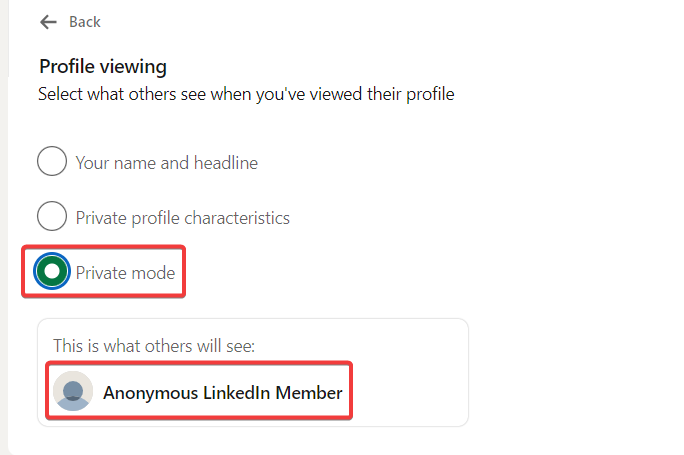
- Choose "Private mode" to browse anonymously. Alternatively, select "Private profile characteristics" to display limited details (like job title or industry) instead of your name.
With private mode enabled, other members won’t see your name when you view their profiles. Note that enabling this setting also limits the information you can see about who viewed your profile.
The Trade-Offs of Anonymous Browsing
Anonymous browsing is helpful, but there are trade-offs to consider:
- Loss of Profile View Insights: When you browse in private mode, LinkedIn limits or hides the list of people who viewed your profile.
- Perception and Engagement: Appearing anonymous can make you seem less open to connection, which may reduce outreach opportunities.
Tips for Using LinkedIn Effectively While in Private Mode
Even if you prefer to browse privately, you can still maintain a strong presence on LinkedIn. Try these tips:
- Optimize Your Profile: Keep a professional photo, clear headline, complete work history, and relevant skills.
- Engage with Content: Like, comment on, and share posts that matter in your industry to stay visible.
- Network Thoughtfully: Send targeted connection requests and follow up with personalised messages when appropriate.
- Follow Companies and Groups: Join industry groups and follow companies to receive updates without directly viewing individual profiles.
Advanced Strategies for LinkedIn Anonymous Browsing
Beyond the basic privacy toggle, these tactics help you gather information discreetly and responsibly.
Leveraging LinkedIn Groups for Insights
Participating in relevant LinkedIn groups lets you observe conversations, trends, and people’s roles without visiting individual profiles directly.
Monitoring Competitors Discreetly
Use private mode to check competitor pages and employee lists for strategic insights — without alerting them.
Considering a Secondary Research Account
Some people create a separate LinkedIn account for research. If you choose this route, make sure the account complies with LinkedIn’s terms of service and represents real information. Misleading or fake accounts can lead to restrictions.
Engaging with Articles and Posts
You can still engage publicly by commenting on and sharing articles. That helps you stay visible without revealing your profile views.
Tracking Industry Trends
Use searches, follow hashtags, and set alerts for key companies and influencers to stay on top of developments without extensive profile browsing.
Practical Examples of Using LinkedIn Anonymously
Here are real-world scenarios where anonymous browsing is helpful:
- Job Seeker Researching Potential Employers: Learn about a company’s team and recent hires without tipping off recruiters.
- Recruiter Sourcing Candidates: Review many profiles discreetly during the early stages of sourcing.
- Business Owner Analyzing Competitors: Observe competitors’ hiring trends and leadership changes privately.
- Strategic Networking: Research high-profile individuals before deciding whether to engage publicly.
Using SIMUB's Disposable Numbers for LinkedIn
If you want an additional layer of privacy when registering or verifying accounts, a disposable virtual number can help. Here’s how to use SIMUB's disposable numbers with LinkedIn:
- Visit SIMUB's website: Go to the SIMUB registration page to obtain a disposable virtual number after signing up.
- Sign Up for LinkedIn: Use the virtual number provided by SIMUB during LinkedIn’s sign-up process.
- Verification: Receive LinkedIn’s verification code on your SIMUB virtual number.
- Complete Registration: Enter the verification code on LinkedIn to finish setup.
Using SIMUB's virtual numbers keeps your personal phone number private and can simplify account verification while protecting your contact details. Always ensure your use of virtual numbers follows the terms of service of the platform you’re using.
Conclusion
Anonymous browsing on LinkedIn is a practical tool for discreet research, recruiting, and competitive intelligence. By switching to private mode, applying the advanced strategies above, and—if needed—using SIMUB's disposable virtual numbers, you can protect your privacy without sacrificing effectiveness.
Remember: anonymous browsing is one part of a broader LinkedIn strategy. Combine privacy-minded browsing with a polished profile, meaningful engagement, and intentional networking to get the most from the platform. Happy networking!